Showing posts with label Google. Show all posts

Wednesday, September 24, 2014

Google Drawing Project

In one of my tech classes we have been learning about and exploring all of the various Google Apps.  Recently, students completed a Google Drawing project--which was actually 4 different mini projects all in one!

After learning the ins and outs of Google Drawing, students got to pick from a menu of project items 4 different projects they were going to complete using Google Drawing.


Along with the bullet points for each project, students were required to use Google Drawing to create their project.  After that, the creative juices were left to flow with them to see what they could come up with to fit that project!
Overall, I am super impressed with what these ladies came up with for their projects!  Very creative, and very detailed projects from all 8 categories were turned in!

Here are a few samples of the projects below that the girls' turned in.  I really think these types of "menu" projects are great for students because it allows them choice in how they are demonstrating that they understand the content at hand, and they are able to pick a project that they like rather than just being assigned one way to do it.

Anyways, here are a few project samples from our recent Google Drawing project:


Hero Project Revisited

Last year with my middle schoolers I had them complete a hero project in tech class.  Well, this year at my new school, I decided to use my old hero project from MRH as the perfect project and tool for teaching how to use Google Presentation/Slides.

The directions students had for this project were spelled out fairly clearly for them: they were creating a hero (using the HeroMachine 2.5) that they then were creating a presentation of detailing their life, enemies, superpowers, family, sidekicks, background, and much, much more.  This project was to practice and demonstrate the students' skills and understanding of using Google Presentation, but it also allowed them some creativity in creating their hero and what he/she's characteristics are.

Click on the links below to go to a few examples of the complete Hero Projects the students created.  If you click here you can see the directions for this project as well.  Enjoy these heroes--they are fantastic!


Wednesday, August 20, 2014

Missouri Google Summit

This Missouri Google Summit is COMING!!  I am so excited!  I recently did a guest blog post for the Missouri State Teacher's Association all about it.  Click the link below to read about the summit, details, and how you can sign up!


For those who don't want to read the blog, check out gafemo.com for all of the details about the summit (Saturday, October 4th!) and how you can sign up!  I've linked below the beautiful flyer that has oodles of info on it too!  If you're in Missouri, a teacher/educator, and a Google fan, definitely check this out!  You don't want to miss it!


Thursday, April 24, 2014

Google Tour Builder: Civil War Timeline

Earlier this year my students did a Google Tour Builder with the Donner Party--they mapped out the Donner Party's route west via Google's new Tour Builder.


This project was a huge success--for both the students and me!  The Google program was easy to use, and even in the beta version it had minor bumps and hiccups when the students used it.

I've been wanting to do a timeline-type activity for the Civil War, but wasn't impressed with any timeline software out there.  We've used Timeglider in the past, which is pretty good (and free!), but I didn't really like the appearance of it.  I then thought, "Wait, why couldn't we use Google Tour Builder to make a timeline?!"  It would be perfect: each battle/event would be a new "location", and with Tour Builder you can input start dates, end dates, information, location, pictures, and oodles of details.  This would be perfect!  Plus, the students already know how to use it since we used it earlier this year.  So I decided we'd go this route with our timeline.

Students were given several specific events/battles that they'd need on their timeline, along with what information each of their "locations" would need.


The students set out to create a timeline using Google Tour Builder.  The results were awesome--and definitely a much better looking (and interactive and very visual, with the map serving as the background) timeline than anything else I think I could have had them done.

Check out a few of the students' timelines below.  Once again, I'm super impressed with what they created and came up with!


Wednesday, February 12, 2014

19th Century Reform Movement Posters

Recently in social studies we've been looking at various reform movements of the 19th century.  Our friend John Green from Crash Course gave us a really nice introduction to these reform movements before we dove into our chapter in History Alive! about the movements we would specifically look at.

We focused our lens on 5 particular reform movements of the 1800s: prison reform, education reform, women's rights, abolition movement, and the spirit of reform.  After we spent some time in class reading about these and doing a few activities with them, the students picked out of a hat one of these five reform movement that they'd focus on for their poster research project.

Using the directions below (or here), students set out to create a detailed poster on their reform movement.  We had spent some time looking at past posters that were advocating for a particular movement so students could get an idea of what a good poster looked like (although theirs would have more words and text on it, since I was requiring them to include more than most posters include :).

Directions: Using your Lesson 17 reading and notes, create a poster (using Pages, Google Drawing, Keynote, Prezi, Glogster, or another app) that includes ALL of the following requirements about the 19th century reform movement you’ve been given.

Your Poster MUST INCLUDE:

  1. What your reform movement is (title)
  2. When your reform movement took place (date)
  3. What your reform movement did, and the impact it had
  4. At least 2 people who supported your movement
  5. At least 2 pictures
  6. At least 2 things that your reform movement did well
  7. At least 2 things that your reform movement could have improved upon
  8. Your reform movement’s legacy (what impact did it leave on the US?)
  9. How your reform movement has impacted TODAY’s society (you need a specific example for this one...you may need to do some outside research!)
  10. CREATIVE, ENGAGING, and INFORMATIVE!

What I really liked about this project is that students got to choose from a variety of mediums in which they could use to create their poster. One of my own professional goals this year is to give more student choice when it comes to demonstrating their knowledge and what they know; so I felt that this project really opened up some freedom to create a poster in various different formats--Glogster, Prezi, google docs, Keynote, Pages, Murally, etc...

Below are a few examples and links to the posters students created. Once again, I am super impressed with what the students created! They are so creative and really embraced the medium they picked to highlight their reform movement and detail all of the important information about it and the impact that it has had on today's world as well. Enjoy!


Monday, January 13, 2014

Google Tour Builder: Donner Party Style

A few months ago, my friend Eric and I presented at the National Council for Social Studies National Conference in St. Louis.  Both of us being Google Certified Teachers, we decided to do a Google presentation geared towards social studies teachers and the Google apps that they could use in their classroom.  One of the AWESOME (& my personal favorite!) tools we presented about was Google Tour Builder.


Google Tour Builder is an awesome (& free!) web-based app which allows you to build a tour on a map.  Yes, Google Maps and Google Earth already have this feature...but have you ever tried to use it?  It's clunky and not easy to navigate.  Google really cleaned this up with Google Tour Builder: it is so incredibly easy to navigate and use!  Check out a sample tour here.

So I thought this tool would be PERFECT to use with our Manifest Destiny unit.  I challenged the students to create a tour for the Donner Party: mapping their route west and documenting (with photos and text) all that took place at the places they stopped.

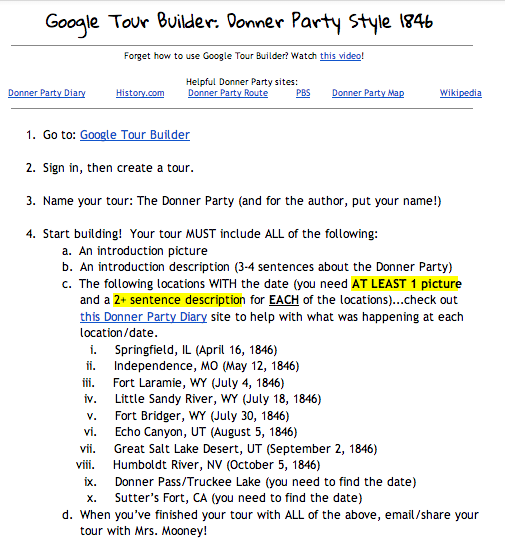
I shared with them a doc (see below) with all of the requirements on it they'd be responsible for including in their tour.


I made a simple "how to" video for them on what they needed to do to get started on the tour builder.


Then they set out to create their own tours!  I am very impressed with how their tours turned out!  They are easy to navigate, easy to read, and follow the Donner Party's journey west in an easy to read format!  Check out a few examples below!  I can't wait to do more Google tours with them in the future!


Thursday, October 24, 2013

Hero Project


In tech we have just completed another project--this one was all about a hero!  The students really had a great time with this project: it pulled together different tech elements (wordle, Google presentation/Keynote, Hero Machinedafont, and many others) in a creative fashion to have students create a presentation detailing all about their hero!


Check out the entire directions/project requirements here.

The students got to present their heroes to the class when they were finished...and each and every hero was unique and different and awesome!  Check out some of the presentations below from our hero project!  Enjoy!


Friday, October 11, 2013

Teaching #throughglass 2

Remember my first "Teaching #throughglass" post earlier this school year?  I said I was going to do a series of what it is like to see the classroom (or in this instance the outdoor classroom!) through the teacher's eyes as filmed by using Google Glass.

I have just added my second teaching #throughglass video to my blog series; however, this one is quite a bit different than my previous video.  This one captures what it's like for a teacher to go on a single day expedition (field trip) with a group of 8th graders.  Since our motto at the middle school is "School as Expedition", we take a lot of "expeditions" to various places for various lengths of time.  This particular expedition we took half of our 8th graders to Forest Park to do a fish sampling and data collecting expedition.  Below in my second teaching #throughglass video you'll see a 12+ minute glimpse of what it's like for a teacher to be on a single-day expedition with middle school students...stay tuned later in the year for a glimpse into what's it's like on a multi-day overnight expedition!  Enjoy!


Thursday, August 22, 2013

Teaching #throughglass

Woo hoo!  It's a new school year and another notch in my teaching belt--this is year SIX of teaching for me--and I can't believe it.  It still feels like yesterday I was an undergrad in teacher education classes!

I apologize for the "lack" of blog posts the past several months; having a new baby around really turned out to be a time-suck :)  However, I wouldn't change a second of it!  I am hoping to make-up my lack of blogging (and tweeting too for that matter!) now that the school year is underway, my little man is in a nice routine (for the moment!), and I'm gung-ho to make this school year an awesome one for my 8th graders.

This summer was a great one; I got to spend almost every second with my handsome little boy--who arrived in May--and enjoy the unseasonably cooler weather in St. Louis.  I did however take a quick 24-hour trip to New York City to pick up my Google Glass.  Don't know what Google Glass is?  Check this out.  I was selected to be part of the Google Glass Explorers program (after my entry on Google+ was chosen by Google to make me a Glass Explorer) which gives only a few thousand people in the US early access to Google Glass before it's available to everyone.  I was shocked that I got picked, and honestly didn't think I'd be able to swing flying up to NYC to pick them up (one of the stipulations for being part of the program: you had to pick them up in either NYC, LA, or Mountain View, CA) with a newborn.  Well, with some crafty planning, a free airline ticket, and an accommodating cousin who lives in NYC, I was able to swing it and only be away from my little man for 24 hours.


Thus far, I am in love with my Glass.  They are so fun to play with and I love how they sync with my iPhone.  It's great to be able to take a phone call, post a tweet, snap a picture, read the latest news on CNN with them, or capture Scooter going for a dip in our pool.

However, one of the main reasons I wanted to get Glass was to use it in my classroom.  So often we see videos of teachers teaching--usually from a camera mounted in the corner of the classroom.  Those videos are great, but I really wanted to give people the "teacher's" point of view--what I see day in and day out in my classroom from MY eyes.  Google Glass allows me to do that and share it with you.

So, this year I'm planning on doing a blog segment project here called "Teaching #throughglass"--the #throughglass is the hashtag us Google Glass Explorers are using to tag our videos and pics we take using Glass.  These will be videos allowing you a glimpse through my eyes--the teacher's eyes--into the classroom.  You'll see the traditional classroom as well as our outdoor and community classrooms as well through our expeditions we embark on.  This project makes me feel incredibly vulnerable as an educator, but I'm determined to set that fear aside--and even overcome it!--in letting the world glimpse into my classroom and my teaching style in hopes of making me a better educator.  So, with that said, I embrace your comments and feedback, knowing they'll make me stronger and a better teacher for my kids both inside and out of the classroom.  Enjoy!

Sunday, May 20, 2012

Year Favorites from Ms. Pepin

As we approach the last day of the 2011-2012 school year, I'm wrapping up with asking my students what their favorite projects were, what they've taken away from this year, and what has "stuck" with them from 8th grade social studies.

As those answer filter in this week, I thought I'd start off with some of my favorites from this year...and can you think of a better way to do it than a TOP TEN list?!  I couldn't...so here it is!

10. Getting to hear Rev. Billy Kyles speak at MRH.  This was one of the coolest experiences I've ever had.  To hear a man speak who was so close to the most influential man in the Civil Rights movement?  This is something I don't know if I'll ever get to top.

9. The variety of digital projects we did this year, especially things like a one-class period video challenge, or a twitter challenge, I've loved the different projects that the kids have put out this year.  It really showcases in a whole new way the things their learning and the cool means they can show that off.


8. The immense amount of service this 8th grade group has done: from helping clean up Forest Park to tagging storm drains for MSD, these kids love to serve and give back.

7. Having my students' voices published in The Patch.  8th graders speaking out about things that are important to them and having their voices heard?!  Pure awesomeness.  I hope these girls never stop speaking their mind and motivate others to do the same, regardless of their age.

6. C-SPAN StudentCam Project...this was an awesome project that one of my classes got to participate in.  Even though none of them were "winners" by C-SPAN standards, they all were in my book.  All of their videos were incredibly researched and phenomenally put together.  Make sure you check them all out here if you haven't.


5. Being a Google Certified Teacher.  This was hands-down the coolest experience I've ever had the opportunity to be invited to participate in.  Even making my application video and having my students "ooooh" and "ahhhh" over it was awesome, but to be chosen and get to spend a week in London learning about all things Google?! Priceless.


4. The students are great, but having an amazing staff makes coming to work even more awesome each and every day.  I mean, how many schools do you know where the staff (& even some students!) devotes an entire day to celebrating the awesomeness of our former assistant principal TKA?!!


3. Bellefontaine Cemetery Expedition -- this was a great expedition and has really opened my eyes to the endless possibilities for mobile learning via mobile devices.  I LOOOOOVED this!


2. Dauphin Island Expedition was ah-mazing.  Re-read my previous post or watch some of their amazing reflection videos.


1. This 8th grade class is my favorite, and will always have a special place in my heart.  They're my first "loop"--having had the pleasure to teach them in both 7th and 8th grade--and they'll always stay ingrained within me as my starting kiddos at MRH.  I love this group so much...they've taught me a lot, and I hope I've done the same for them!  I'm sure going to miss them!  And, if any of my MRH kiddos are reading this, DO NOT BE A STRANGER!  Come visit me!...and often!!

Thursday, May 10, 2012

Causes of the Civil War Websites

Recently social studies students were given the task to create a website that documented the top 4 causes they believed were the most important and influential in contributing to the onset of the Civil War.

Students were first shared a Google Doc with the directions for their site challenge on it.  Students had to research (or go back and "re-research" since we had already covered these topics) the various topics and come up with the 4 they felt were the most important causes of the Civil War.

Once they had come up with their 4 and completed a pre-website planning sheet, they then used the the site template (which had directions for each of the subsequent pages) to make a copy of and start building their own site.

I guess I can't say it enough, but once again I was super impressed with what the students came up with both in their website creation and analysis of why they chose those 4 causes as the most important.  Below are several of the student's websites...check them out!  I'm sure you'll be as impressed as I was!  (FYI, the "discussion questions" section for each won't load for you...since these were internally created websites only people at MRH can see that part...sorry!)


Monday, April 9, 2012

Google Teacher Academy


Wow.  Where to start?  I have no idea where to even begin this blog post...and not for a bad reason, but for the sole fact that I have a bazillion amazing stories, ideas, and resources that I want to talk about and share, and just don't know where to start!  Usually I blog about the happenings in my classroom, but for this post I decided to use it as a reflection piece for my experiences at the Google Teacher Academy (GTAUK) in London, England on April 4th, 2012.

Prior to attending GTAUK, I had only ever dreamed of becoming a Google Certified Teacher (GCT).  It was something that I really wanted to do, but never expected to actually be selected to attend.  When I completed my application back in February, I capped it with submitting the video below I created around classroom innovation.


After I had submitted my application, I had gone through YouTube looking at the other videos submitted by others who applied to GTA, I became a bit disheartened about my chances because every video I looked at seemed to blow mine out of the water.  I told myself it wasn't a big deal if I didn't get it--there were probably thousands of people applying, and this was my first time applying, so I could always apply to the next Academy.  However, all of my worrying was for nothing.  When I was notified a couple weeks later that I had been selected to attend, I was in disbelief; I could not believe that I was actually chosen!  And, to cap off my excitement, the Academy was being held in London, England--where I use to teach!  I was on cloud nine.

Once my excitement subsided a bit (not too much though), I had a lot to do before jetting off to London for GTAUK.  Less than 48 hours after I was notified I hopped on a bus with 75 middle schoolers to go down to Dauphin Island, Alabama for our 8th grade expedition.  Once I returned from that amazing expedition, I then set my sights on GTA.

The night before GTA I was so excited I could hardly sleep; I felt like I was 8 years old again and eager with anticipation of Santa's arrival.  I had just had an awesome informal meet-and-greet with a majority of the GTA participants at a local London eatery, so it was great to meet some of the people I'd been talking to on twitter and google+ the past several weeks.  The day finally came, and I made sure I got to Google a little bit early just in case there were any problems on the Tube.


At Google we were placed in teams, which was a genius idea.  It gave us a chance (pre-GTA) to meet our group and chat with them prior to the start of the Academy.  I was on Team Lumiére, which was led by the amazing Jim Sill.  Wow, what an awesome guy with a wealth of information and a passion for education and technology.  I felt so fortunate I got to be on his team.  We remained with our team throughout the day, but it was simply for ease of movement of people for different sessions.  I tried to branch out and meet and chat with as many people as I could, on my team or now.

Team Lumiére

Many people have asked me about what I actually did at GTA.  To someone who hasn't experienced it, or doesn't have a knack for Google or EdTech stuff, it is a bit difficult to describe because there was so much going on!  However, in a nutshell it was a complete day filled with everything Google: Google Docs, Maps, Gmail, Google Chrome, YouTube, Groups, Google+, and so much more!  But it wasn't simply "hey, here's a bunch of awesome things Google offers!" but more so it was all of these cool Google resources and how they can be implemented and used effectively in the classroom.  I got so many new ideas from this day my Evernote doc was bursting with new resources, ideas, and how I can use them in my classroom.  I know you're probably reading this and thinking, "Hey!  I want to know what these are!"  So here are a few of my favorites from the day (and I just say "favorites," because my list is substantial and could go on for quite a while!  If you want to chat more about my ideas, resources, or GTA experience, shoot me a tweet or an email)

Favorite New Ideas:
  • Have students create their own personal "Google Map" to outline/timeline events in history, or events in their own lives (can add pictures, links, etc... to each location! how awesome!)--this was a great idea I got from Tom Barrett)
  • Use Google Moderator as a "discussion board" (or "question board") platform in the classroom--quick and easy way to get students interacting in the classroom
  • Google Sites for student portfolios or student websites--have students create a website and have them store their work, documents, notes, etc... in it throughout the year.  They can embed pictures, blogs, discussions, docs, and so much more!  Plus, it's in the cloud!


Looking back, the day feels like a blur; it flew by so fast I think I am still processing all of the amazing information, connections, resources, and ideas I accumulated.  It still feels surreal to me that I was actually chosen to attend, and even more surreal that I am now a Google Certified Teacher.


I cannot tell you how honored I am to now be a part of this amazing community of teachers who are passionate about education and technology.  I feel so fortunate and blessed to be in this group now, and am determined to put my GCT-status to good use.  I feel like I have a wealth of information that I have gained and built upon thanks to the Google Teacher Academy, and I am determined to share what I've learned with others in my district, community, and beyond.  I know the Academy has opened the doors to a wealth of opportunities, resources, ideas, and connections, and I WILL take complete advantage of this.


I want to thank everyone--especially Maplewood-Richmond Heights--for allowing me to attend this amazing Academy and for the wealth of resources, knowledge, ideas, networks, and information I've taken away.  I cannot express my gratitude enough, and I hope my continued passion for learning, technology, and education shine bright in my future as both an educator and a Google Certified Teacher.

Tuesday, February 14, 2012

Google: The Collaborative Tool

So I'm sure my students already know this, but Google Apps are one of my favorite things to use in the classroom!  We've used them to take notes before, do presentations, store files, communicate with each other, and now, most recently we've used Google Docs as a peer editing tool.

For our last essay, examining John Gast's 1872 painting called American Progress, students had to get at least 2 of their peers to edit their rough drafts before I would edit it.  When you edit on paper it can be really hard to tell who's writing what, who's comments are who's, and so on.  With Google Docs it becomes so remarkably simple to "edit" and collaborate on an essay (or any document!).  All that needs to happens is this:
  1. Students create a new doc to type their essay on
  2. After typing their rough draft, students "share" (blue box, upper right corner) their doc with as many people as they want to view/edit it
  3. Other students then open the docs that were shared with them and they can now "edit" directly on the doc.  They do this by highlight words or sentences and then selecting "insert --> comment" and adding a "sticky note" comment that will highlight the word/sentence and appear on the right hand side of the screen.  Students can comment on misspellings, sentence structure, ideas, anything!  And (best part), it time and name stamps the comment!  There can be as many comments as is shared out; others can comment on the same word/sentence or other ones.  There's no limit!
  4. The original student's document that now has been "commented" on (i.e. edited), that student can go make changes and "check" (approve) the comments once they've made the change to that document so they know that "issue" has been addressed.
Overall I am so happy and in love with this process.  I have never seen my students more engaged and wanting to edit each others' work than with this process.  I encourage you to give it a try in your classroom!  It can work for major essays or simple, short writing assignments!  Plus, Google Docs is also a great collaborative tool for group work where multiple people can be working on the same assignment in one place--one Google Doc.

Below are some screenshots from my students recent collaboration with their essays and Google Docs.  Enjoy!


Thursday, April 21, 2011

Rockin' Exploration Websites

My students are just wrapping up their exploration unit this week.  We've literally been in this unit since we got back from winter break in January, so it's nice to be able to move into our next and final unit of the year, which is colonization.

Here are some pics of my 7th graders working hard on their sites:


However, I want to share some AMAZING websites my 7th graders just finished creating for exploration.  They were each given a website template (using Google sites and their school Gmail accounts) and a topic that we'd covered in exploration.  They then were turned loose to create a site about their topic, making sure to include all of the site requirements outlined on the template site.  I was just amazed as to what these students came up with!  Some took to other sites, such as xtranormal.com or goanimate.com to create animations about their exploration topic instead of just typing the information.  Anyways, their sites turned out great...and I wanted to share with you the site I created to house all of the students' exploration sites.  So check out the link below and enjoy!

Related Posts Plugin for WordPress, Blogger...