Showing posts with label Manifest Destiny. Show all posts

Thursday, January 30, 2014

Andrew Jackson's Facebook Profile

A couple years ago my 8th graders made Facebook profiles for Andrew Jackson.  I really liked this activity because it had them synthesize the material they read about Jackson into a modern-day social media profile.  I had them use a Pages template to complete their profile for Jackson.

Social media is such a huge part of our world today--and the lives' of these 8th graders!--so I thought it'd be great to bring a little bit of it into our lesson.  Like we did last week with our War of 1812 twitter challenge, we took Facebook and used history to make it come alive.

Since Facebook is blocked at school, we had to improvise a little bit.  There are some great sites out there like Fakebook that allow students to create Facebook statuses; however, I really liked the traditional Facebook layout because it asks for so much great information that can really give you a good bio or overview of a person.  So I just whipped up a template for the students to use and then they got busy creating their Facebook profiles for Andrew Jackson.  We also talked about how when they were going to list Jackson's "friends" that these didn't have to be literal "friends", but instead could be what we think of as Facebook friends: people you may not necessarily be "real" friends with, but you are on social media because you are curious as to what they're up to.

Here are a few of the profiles students created.  Once again, their creativity shines through!  The "current status" portion is my favorite: they sure come up with some funny statuses that Jackson probably could have said! :)  Enjoy!


Tuesday, January 28, 2014

Donner Party Skype Chat

Recently in our Manifest Destiny unit we have been talking about the Donner Party (remember this post about using Google Tour builder to map the Donner's route?), and I thought it would be cool to see if we could talk to actual Donner Party historians from Truckee (near where the Donner Party got stranded).

After a little searching, I found The Donner Memorial State Park and grabbed a contact email from their webpage.  After my email was forwarded around to the correct person who could help me with what I was inquiring about (doing a video chat with a Donner Party historian), I was put in contact with an awesome person who wanted to help us out and set up a Skype chat! 

After many email exchanges and picking a time that worked the best for both us and the historian and park ranger, my students developed some great questions that they'd ask the historians.  Unfortunately only one of my classes was actually going to be participating, but the rest of the classes got to hear and see a bit of the Skype chat after it was over.

Donner Party Skype Chat Questions

  • Tell us a little about the Donner Party.  Is there any cool facts that not many people know about in regards to the Donner Party?
  • What do you find most interesting about the Donner Party’s story?
  • Why didn’t the Donner Party turn back once they got a warning?
  • Why did you become a Donner Party historian?
  • Were the Donner Party actual cannibals, or is this something that is still a controversy today?
  • Was James Reed really one of the group’s leaders who didn’t listen to the warnings and signs about taking the “short cut”?
  • Was the Donner Party the most tragic westward expansion party?  Were there any other parties that had experiences like the Donner Party?
  • Who was the first person to die?
  • If we were to visit the Donner Party Memorial today, what would we find?  
  • What did they do with the remains of the bodies?  Bury them?  Were there any left?
  • Who all survived?  Were there any kid survivors?
  • If it snowed 6 feet, how did they walk around their camp?  How do you even set up a camp in so much snow?
  • Would you want to be someone moving westward if you didn't know about the Donner pass?
  • Why didn't the Donner turn back when they got warnings about Hastings Cutoff?
  • How do we know today about everything that happened with the Donner Party?  Did they keep diaries or journals?

  • Did anyone commit suicide, or did they all die of “natural” causes or diseases?


The chat went fantastically well! My 4th period social studies students totally rocked it; it was completely student-led, and they asked the historian and ranger some great and insightful questions. It really was a super cool experience (I think on both the historian and students' end!!) and I really hope to do more of these in the future with other historians in other content areas. As much as I love Google hangouts, that option for a video chat wasn't available for us this time, so Skype Classroom was a good alternative to use that worked out great for both ends!

Friday, January 24, 2014

The War of 1812 Twitter Challenge

A couple years ago we did a twitter challenge with the War of 1812.  This year I wanted to do the same thing, but actually take it a step further and modernize history.  Students wouldn't just tweet on paper, they would actually take their tweet and LIVE TWEET IT on the twitter account I set up for this activity, @the_war_of_1812.

Students had to synthesize their reading, notes, and discussion questions that we did in class the day before and turn them into a 140-character tweet that summarizes the War of 1812.  They could use text speak (b4 = before, 1 = won, etc...) so they could get as much text in their tweet as possible.

Students first tweeted on paper, then grabbed our classroom's Nexus 7 tablet and live tweeted.  At the end of class we looked at all of the tweets on Storify to see what everyone had to say.  Their exit ticket out of class was not only live-tweeting their tweet, but handing in their paper tweet as well.

If you click HERE you can check out our Storify story.  Enjoy!


Monday, January 13, 2014

Google Tour Builder: Donner Party Style

A few months ago, my friend Eric and I presented at the National Council for Social Studies National Conference in St. Louis.  Both of us being Google Certified Teachers, we decided to do a Google presentation geared towards social studies teachers and the Google apps that they could use in their classroom.  One of the AWESOME (& my personal favorite!) tools we presented about was Google Tour Builder.


Google Tour Builder is an awesome (& free!) web-based app which allows you to build a tour on a map.  Yes, Google Maps and Google Earth already have this feature...but have you ever tried to use it?  It's clunky and not easy to navigate.  Google really cleaned this up with Google Tour Builder: it is so incredibly easy to navigate and use!  Check out a sample tour here.

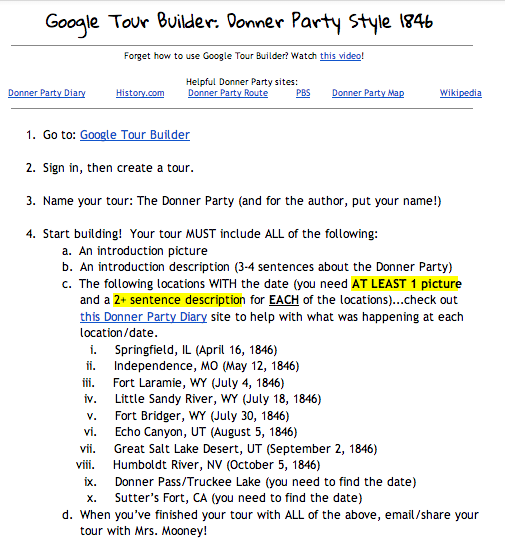
So I thought this tool would be PERFECT to use with our Manifest Destiny unit.  I challenged the students to create a tour for the Donner Party: mapping their route west and documenting (with photos and text) all that took place at the places they stopped.

I shared with them a doc (see below) with all of the requirements on it they'd be responsible for including in their tour.


I made a simple "how to" video for them on what they needed to do to get started on the tour builder.


Then they set out to create their own tours!  I am very impressed with how their tours turned out!  They are easy to navigate, easy to read, and follow the Donner Party's journey west in an easy to read format!  Check out a few examples below!  I can't wait to do more Google tours with them in the future!


Tuesday, February 14, 2012

Google: The Collaborative Tool

So I'm sure my students already know this, but Google Apps are one of my favorite things to use in the classroom!  We've used them to take notes before, do presentations, store files, communicate with each other, and now, most recently we've used Google Docs as a peer editing tool.

For our last essay, examining John Gast's 1872 painting called American Progress, students had to get at least 2 of their peers to edit their rough drafts before I would edit it.  When you edit on paper it can be really hard to tell who's writing what, who's comments are who's, and so on.  With Google Docs it becomes so remarkably simple to "edit" and collaborate on an essay (or any document!).  All that needs to happens is this:
  1. Students create a new doc to type their essay on
  2. After typing their rough draft, students "share" (blue box, upper right corner) their doc with as many people as they want to view/edit it
  3. Other students then open the docs that were shared with them and they can now "edit" directly on the doc.  They do this by highlight words or sentences and then selecting "insert --> comment" and adding a "sticky note" comment that will highlight the word/sentence and appear on the right hand side of the screen.  Students can comment on misspellings, sentence structure, ideas, anything!  And (best part), it time and name stamps the comment!  There can be as many comments as is shared out; others can comment on the same word/sentence or other ones.  There's no limit!
  4. The original student's document that now has been "commented" on (i.e. edited), that student can go make changes and "check" (approve) the comments once they've made the change to that document so they know that "issue" has been addressed.
Overall I am so happy and in love with this process.  I have never seen my students more engaged and wanting to edit each others' work than with this process.  I encourage you to give it a try in your classroom!  It can work for major essays or simple, short writing assignments!  Plus, Google Docs is also a great collaborative tool for group work where multiple people can be working on the same assignment in one place--one Google Doc.

Below are some screenshots from my students recent collaboration with their essays and Google Docs.  Enjoy!


Related Posts Plugin for WordPress, Blogger...