Showing posts with label Google Tour Builder. Show all posts

Thursday, April 24, 2014

Google Tour Builder: Civil War Timeline

Earlier this year my students did a Google Tour Builder with the Donner Party--they mapped out the Donner Party's route west via Google's new Tour Builder.


This project was a huge success--for both the students and me!  The Google program was easy to use, and even in the beta version it had minor bumps and hiccups when the students used it.

I've been wanting to do a timeline-type activity for the Civil War, but wasn't impressed with any timeline software out there.  We've used Timeglider in the past, which is pretty good (and free!), but I didn't really like the appearance of it.  I then thought, "Wait, why couldn't we use Google Tour Builder to make a timeline?!"  It would be perfect: each battle/event would be a new "location", and with Tour Builder you can input start dates, end dates, information, location, pictures, and oodles of details.  This would be perfect!  Plus, the students already know how to use it since we used it earlier this year.  So I decided we'd go this route with our timeline.

Students were given several specific events/battles that they'd need on their timeline, along with what information each of their "locations" would need.


The students set out to create a timeline using Google Tour Builder.  The results were awesome--and definitely a much better looking (and interactive and very visual, with the map serving as the background) timeline than anything else I think I could have had them done.

Check out a few of the students' timelines below.  Once again, I'm super impressed with what they created and came up with!


Monday, January 13, 2014

Google Tour Builder: Donner Party Style

A few months ago, my friend Eric and I presented at the National Council for Social Studies National Conference in St. Louis.  Both of us being Google Certified Teachers, we decided to do a Google presentation geared towards social studies teachers and the Google apps that they could use in their classroom.  One of the AWESOME (& my personal favorite!) tools we presented about was Google Tour Builder.


Google Tour Builder is an awesome (& free!) web-based app which allows you to build a tour on a map.  Yes, Google Maps and Google Earth already have this feature...but have you ever tried to use it?  It's clunky and not easy to navigate.  Google really cleaned this up with Google Tour Builder: it is so incredibly easy to navigate and use!  Check out a sample tour here.

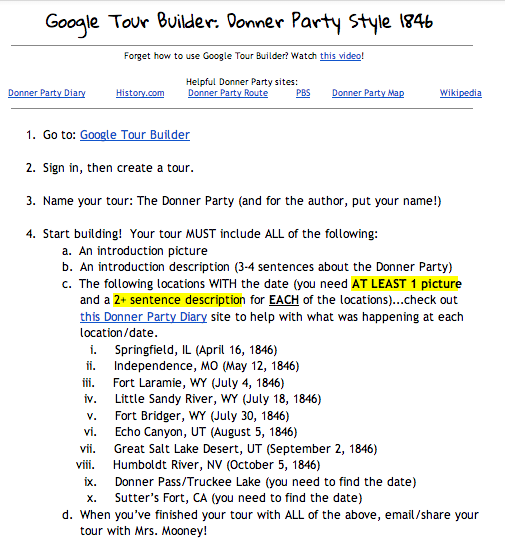
So I thought this tool would be PERFECT to use with our Manifest Destiny unit.  I challenged the students to create a tour for the Donner Party: mapping their route west and documenting (with photos and text) all that took place at the places they stopped.

I shared with them a doc (see below) with all of the requirements on it they'd be responsible for including in their tour.


I made a simple "how to" video for them on what they needed to do to get started on the tour builder.


Then they set out to create their own tours!  I am very impressed with how their tours turned out!  They are easy to navigate, easy to read, and follow the Donner Party's journey west in an easy to read format!  Check out a few examples below!  I can't wait to do more Google tours with them in the future!


Related Posts Plugin for WordPress, Blogger...