Showing posts with label social media. Show all posts
Thursday, April 3, 2014
EdView360 April Blog Post: Destroying the Stereotype of Social Media in Education
If you're interested, check out my April 2014 blog post at the link below for Sopris Learning's EdView360 blog...trying so hard to destroy the negative stereotype of social media in education!
Thursday, January 30, 2014
Andrew Jackson's Facebook Profile
A couple years ago my 8th graders made Facebook profiles for Andrew Jackson. I really liked this activity because it had them synthesize the material they read about Jackson into a modern-day social media profile. I had them use a Pages template to complete their profile for Jackson.
Social media is such a huge part of our world today--and the lives' of these 8th graders!--so I thought it'd be great to bring a little bit of it into our lesson. Like we did last week with our War of 1812 twitter challenge, we took Facebook and used history to make it come alive.
Since Facebook is blocked at school, we had to improvise a little bit. There are some great sites out there like Fakebook that allow students to create Facebook statuses; however, I really liked the traditional Facebook layout because it asks for so much great information that can really give you a good bio or overview of a person. So I just whipped up a template for the students to use and then they got busy creating their Facebook profiles for Andrew Jackson. We also talked about how when they were going to list Jackson's "friends" that these didn't have to be literal "friends", but instead could be what we think of as Facebook friends: people you may not necessarily be "real" friends with, but you are on social media because you are curious as to what they're up to.
Here are a few of the profiles students created. Once again, their creativity shines through! The "current status" portion is my favorite: they sure come up with some funny statuses that Jackson probably could have said! :) Enjoy!
Social media is such a huge part of our world today--and the lives' of these 8th graders!--so I thought it'd be great to bring a little bit of it into our lesson. Like we did last week with our War of 1812 twitter challenge, we took Facebook and used history to make it come alive.
Since Facebook is blocked at school, we had to improvise a little bit. There are some great sites out there like Fakebook that allow students to create Facebook statuses; however, I really liked the traditional Facebook layout because it asks for so much great information that can really give you a good bio or overview of a person. So I just whipped up a template for the students to use and then they got busy creating their Facebook profiles for Andrew Jackson. We also talked about how when they were going to list Jackson's "friends" that these didn't have to be literal "friends", but instead could be what we think of as Facebook friends: people you may not necessarily be "real" friends with, but you are on social media because you are curious as to what they're up to.
Here are a few of the profiles students created. Once again, their creativity shines through! The "current status" portion is my favorite: they sure come up with some funny statuses that Jackson probably could have said! :) Enjoy!
Friday, January 24, 2014
The War of 1812 Twitter Challenge
A couple years ago we did a twitter challenge with the War of 1812. This year I wanted to do the same thing, but actually take it a step further and modernize history. Students wouldn't just tweet on paper, they would actually take their tweet and LIVE TWEET IT on the twitter account I set up for this activity, @the_war_of_1812.
Students had to synthesize their reading, notes, and discussion questions that we did in class the day before and turn them into a 140-character tweet that summarizes the War of 1812. They could use text speak (b4 = before, 1 = won, etc...) so they could get as much text in their tweet as possible.
Students first tweeted on paper, then grabbed our classroom's Nexus 7 tablet and live tweeted. At the end of class we looked at all of the tweets on Storify to see what everyone had to say. Their exit ticket out of class was not only live-tweeting their tweet, but handing in their paper tweet as well.
If you click HERE you can check out our Storify story. Enjoy!
Students had to synthesize their reading, notes, and discussion questions that we did in class the day before and turn them into a 140-character tweet that summarizes the War of 1812. They could use text speak (b4 = before, 1 = won, etc...) so they could get as much text in their tweet as possible.
Students first tweeted on paper, then grabbed our classroom's Nexus 7 tablet and live tweeted. At the end of class we looked at all of the tweets on Storify to see what everyone had to say. Their exit ticket out of class was not only live-tweeting their tweet, but handing in their paper tweet as well.
If you click HERE you can check out our Storify story. Enjoy!
Tuesday, September 24, 2013
Scooter the Dog
I've been doing this blog for several years now and it just occurred to me that not once have I ever given a pitch about my beloved dog Scooter! Now just wait, before you go judging me about this being a "school" blog and I'm posting about my dog, I promise there is an academic undertone to this post...so stay with me.
First, if you haven't already, check out my pup Scooter on Facebook, Twitter, and Instagram. You will not be disappointed, I promise (at the very least, it's always fun to look at his pics for a good laugh, especially on Mondays).
I have been blessed with the most patient dog in the entire world. Seriously. Here's a few pics to prove it to you:
So it's obvious I like capturing images (hence most of my blog posts include some sort of picture or video), and hopefully by seeing those pics it's really obvious to you that I love taking pictures of my dog (and son) posing for all sorts of pictures.
After having tons and tons of "Scooter pictures" at my disposal, I decided to actually do something with them (this is where the academic part comes in!). I've written 3 "Scooter the Dog" children's iBooks that are available for FREE on iTunes for you to download onto your iPad, iPhone, or Mac, and another few iBooks that are on their way to the iTunes store soon once they've been approved by Apple. These are children's books, with an age-level roughly around preschool and early elementary (although my 4 month old son loves to have these read to them, and I've had high schoolers enjoy reading them too! (probably because of the pictures!)). This is a new hobby that I am really enjoying. I've always wanted to write a novel, and decided to start small with doing some children's books first with my own "illustrations" before I tackle my novel idea. Anyways, if you like to read, or like to read to little ones, check out these books! I hope you'll enjoy them (click the links below to go to iTunes to that book) and following Scooter along on his many adventures and journeys.
First, if you haven't already, check out my pup Scooter on Facebook, Twitter, and Instagram. You will not be disappointed, I promise (at the very least, it's always fun to look at his pics for a good laugh, especially on Mondays).
I have been blessed with the most patient dog in the entire world. Seriously. Here's a few pics to prove it to you:
So it's obvious I like capturing images (hence most of my blog posts include some sort of picture or video), and hopefully by seeing those pics it's really obvious to you that I love taking pictures of my dog (and son) posing for all sorts of pictures.
After having tons and tons of "Scooter pictures" at my disposal, I decided to actually do something with them (this is where the academic part comes in!). I've written 3 "Scooter the Dog" children's iBooks that are available for FREE on iTunes for you to download onto your iPad, iPhone, or Mac, and another few iBooks that are on their way to the iTunes store soon once they've been approved by Apple. These are children's books, with an age-level roughly around preschool and early elementary (although my 4 month old son loves to have these read to them, and I've had high schoolers enjoy reading them too! (probably because of the pictures!)). This is a new hobby that I am really enjoying. I've always wanted to write a novel, and decided to start small with doing some children's books first with my own "illustrations" before I tackle my novel idea. Anyways, if you like to read, or like to read to little ones, check out these books! I hope you'll enjoy them (click the links below to go to iTunes to that book) and following Scooter along on his many adventures and journeys.
Thursday, September 6, 2012
Remind101
Alrighty, so I just HAVE to blog about this amazingly awesome FREE app/site I've been using. Seriously, I cannot sing their praises enough...and the fact that it's not only dedicated to educators but that's it's FREE too?!! OMG. It is BY FAR my new favorite education tool.
If you have no idea what I'm talking about, check out Remind101. It's this site where you can send text messages safely to students and parents about anything you need to update them on: homework, upcoming tests, projects, expeditions (field trips), due dates, school changes--and so much more. It's sooooooo easy to set up too. You simply set up a class, and it generates a unique number for parents/students to text your username (mine is @MrsMooney) to and BOOM! They're signed up for text alerts. So incredibly easy.
My favorite feature HAS to be the "schedule later" one. This is so incredibly amazing...and here's why: I always think of a reminder I want to send my students/parents for that night at about 8:30am. I KNOW come 7:30pm when I want them to get that reminder I am definitely not going to remember to send it. It's so great that at 8:30am when I think of this reminder I can schedule a text to be sent to them later that night--so amazingly cool.
If you have no idea what I'm talking about, check out Remind101. It's this site where you can send text messages safely to students and parents about anything you need to update them on: homework, upcoming tests, projects, expeditions (field trips), due dates, school changes--and so much more. It's sooooooo easy to set up too. You simply set up a class, and it generates a unique number for parents/students to text your username (mine is @MrsMooney) to and BOOM! They're signed up for text alerts. So incredibly easy.
My favorite feature HAS to be the "schedule later" one. This is so incredibly amazing...and here's why: I always think of a reminder I want to send my students/parents for that night at about 8:30am. I KNOW come 7:30pm when I want them to get that reminder I am definitely not going to remember to send it. It's so great that at 8:30am when I think of this reminder I can schedule a text to be sent to them later that night--so amazingly cool.
Another way we use Remind101 at MRHMS is for all of our important staff announcements, updates, drills, and anything else our admin team wants to be sent out to all of us quickly. Yes, email works too, but we all are not always on our email 24/7; however, we always have our cell phones attached to our hips, so we use Remind101 to receive text updates instantly about any important MRHMS matters.
Did I mention there is also an iPhone app for it?!! This is so great--especially when those rare occasions come up in which I do remember past 5pm to send a reminder to my students/parents, I can do it from the FREE Remind101 iPhone app--which is also super easy to use too. Golly, I just am in LOVE with this service!
If you are a teacher, CREATE AN ACCOUNT NOW. Seriously. You'll be so glad you did. In the technology-driven world we're living in, why not embrace a tech tool that the students already use more than anything else (texting) and use it to your advantage in your classroom. I am so glad I found this amazing program! Make sure you check Remind101 out on TWITTER too--they've always got good stuff to say!
Monday, March 26, 2012
The Civil War Twitter Challenge
After a student pitched this amazingly awesome twitter idea to me, I decided we needed to roll with it and try it out for an assignment. I have absolutely NO idea how this is going to turn out: it could be a total dud, or something really cool...only time will tell!
Until then, here's the task one of my classes has been given: (or check out the Google Doc HERE)
Your Goal: create and maintain a historically accurate twitter feed for the Civil War figure you’ve been assigned.
Your Task:
Your Task:
- start here...find your person: http://www.pbs.org/civilwar/war/biographies/barton.html
- immerse yourself in the historical figure you’ve been assigned: everything you “tweet” should be from their perspective
- make sure your tweets are appropriate to the time (Civil War era) and person; unless they would have said it, don’t tweet it!
- your tweets can be about anything as long as they are “from” that person...ideas to tweet about:
- their life
- their role in the Civil War
- things they like, hobbies
- their friends and family
- their job
- follow the other Civil War twitter accounts...reply and comment back on things they say...remember, YOU ARE YOUR PERSON!! DON’T COME OUT OF YOUR CHARACTER!
- send AT LEAST ONE tweet a day from your person--remember, you are pretending you are this person, so what you tweet should be from their perspective (like you are really them!)
Like I said, this could be a total wash, or a really cool assignment...so we'll see how it goes! Hopefully the students will learn about their Civil War figure and really take into account their perspective and how that person saw the world--creating almost a synthesis between modern "twitter" technology and what their person was like during the Civil War.
Curious as to what these historical figures (or students!) are going to actually "say"? Check out each of their historical figures' twitter links below to see what they're talking about, or check out the twitter hashtag for this assignment. Enjoy!
Tuesday, February 7, 2012
Facebook Profiles
Who doesn't love social networking, or, especially Facebook?! Social networking is something that should be embraced in schools and used as a tool to enhance learning. There really are so many benefits and positives to using social networking to your advantage in your classroom it's really silly not to embrace it and use it for student learning.
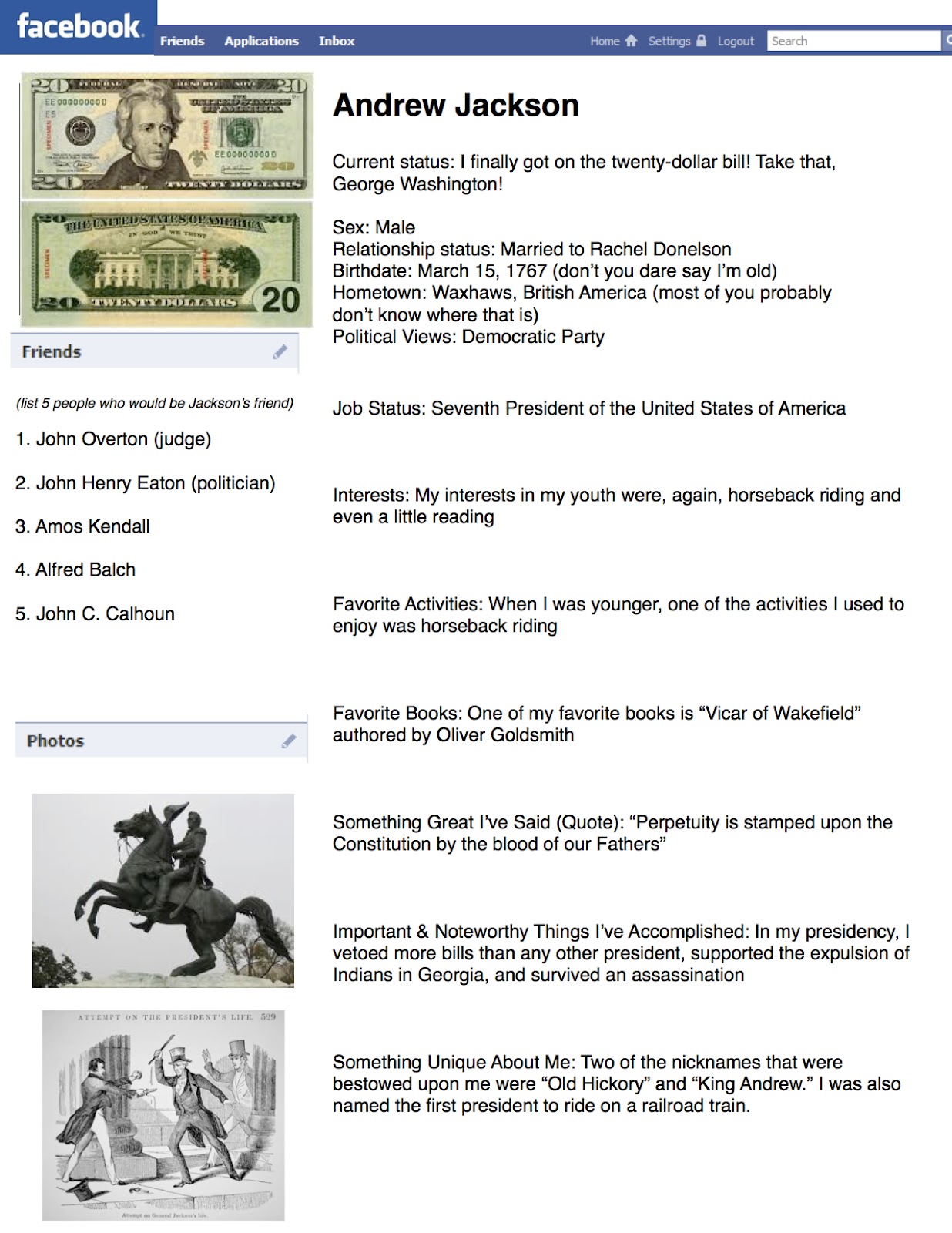
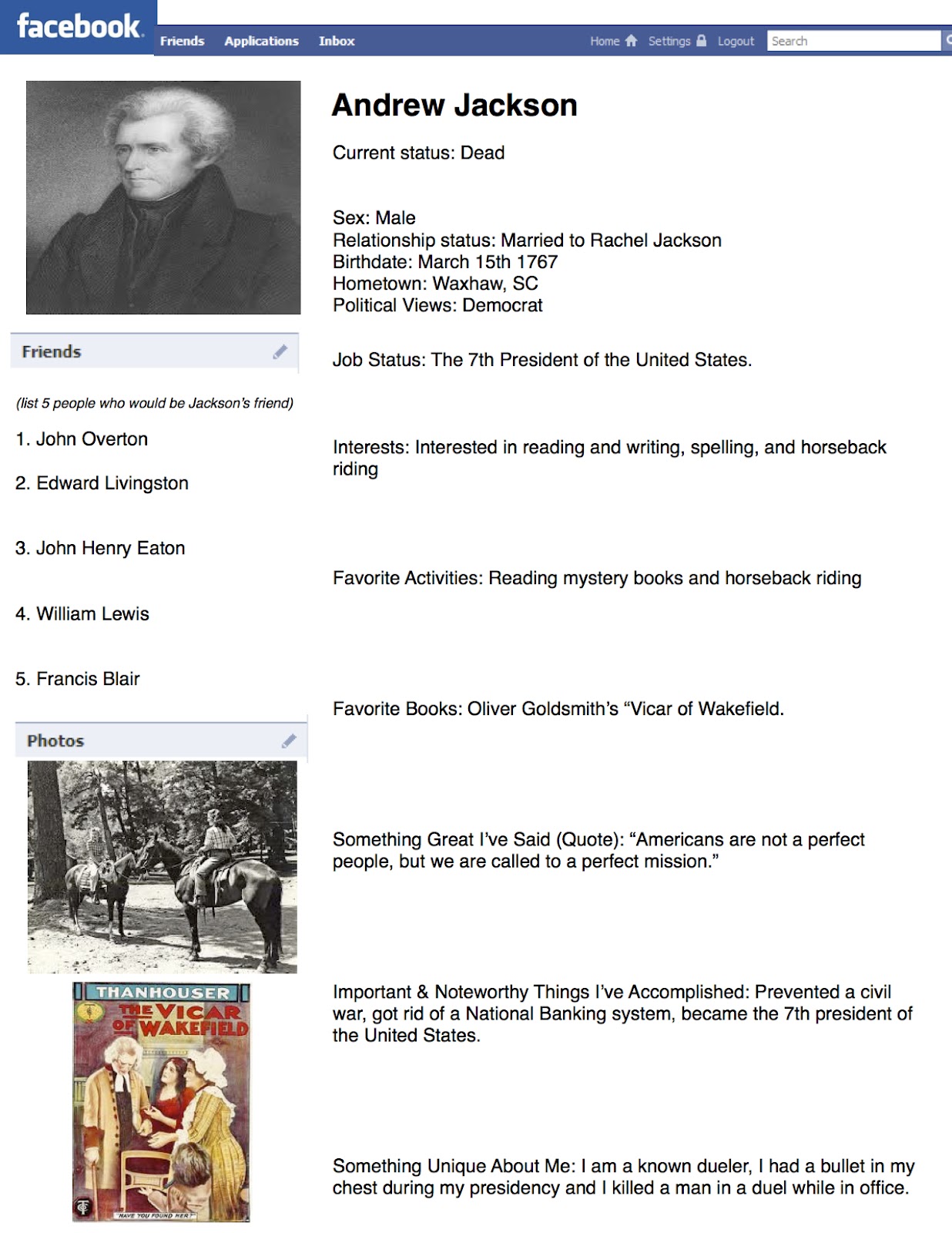
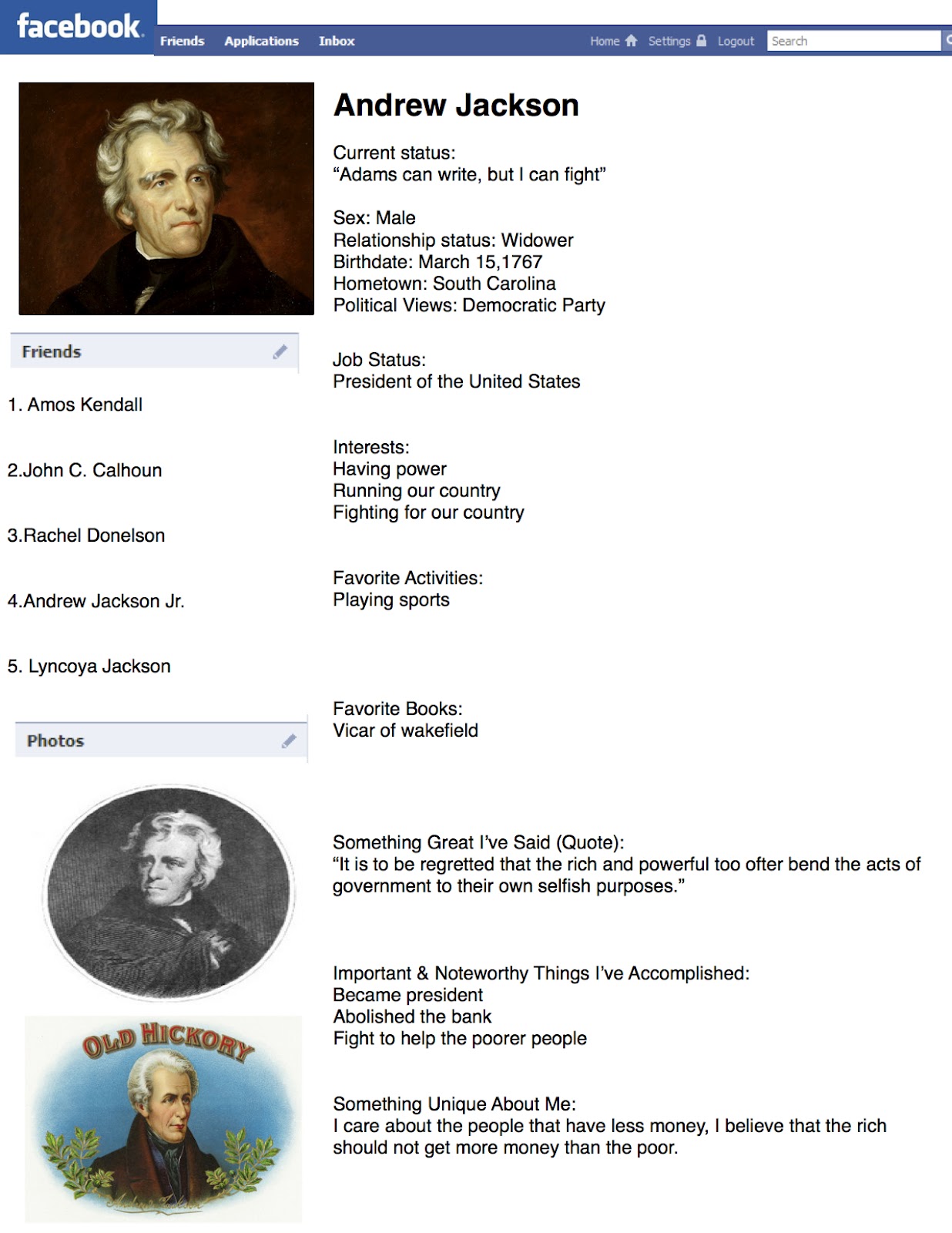
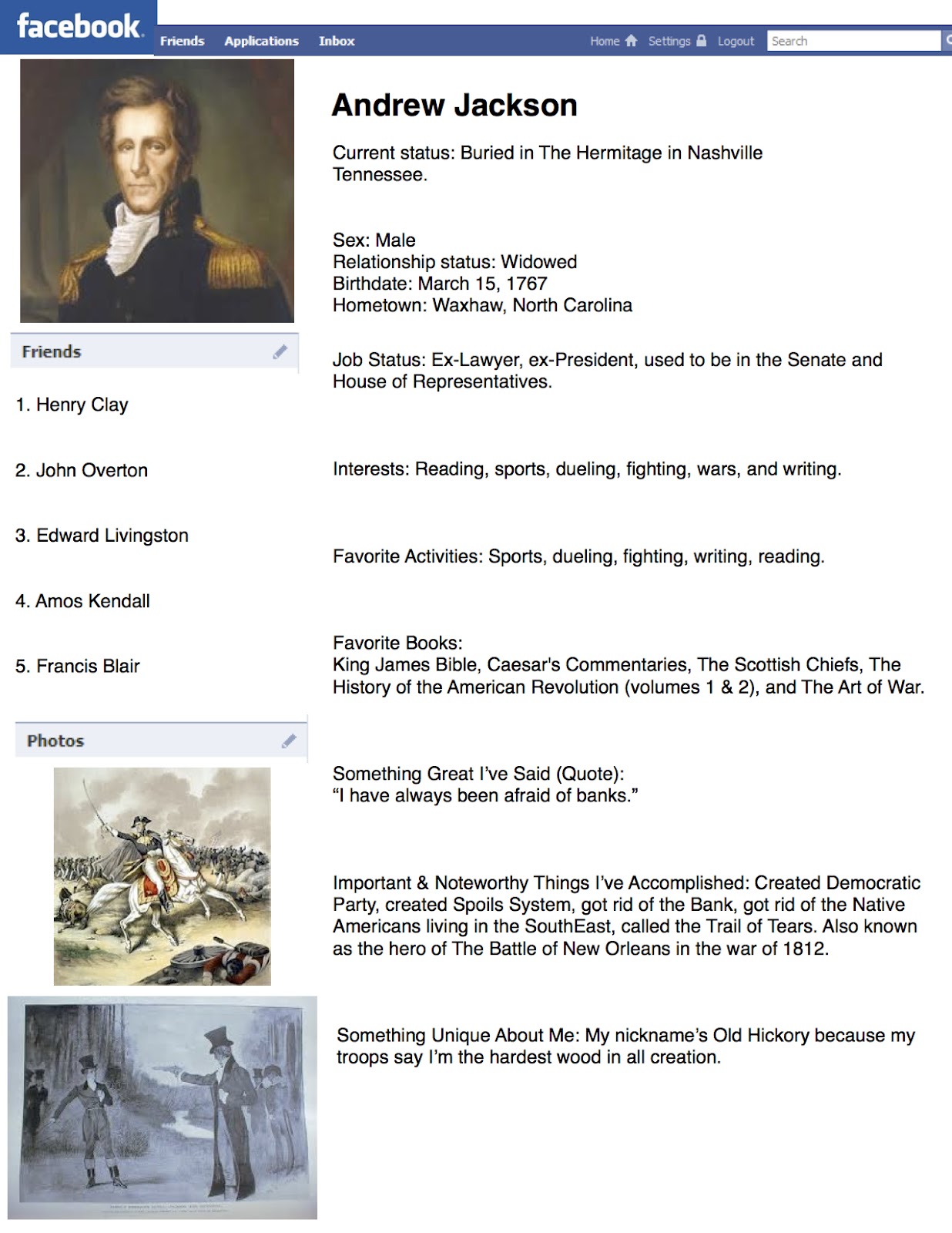
Recently we've been studying about our 7th president Andrew Jackson. For the students to really get a clear picture of who Andrew Jackson really was and his make-up, they were given the task to create a Facebook profile for Andrew Jackson.
Now, there are some great online "Facebook" resources out there for students: Classtools has a Fakebook profile generator, and myfakewall.com gives you the ability to create fake Facebook status updates. These both are great tools that I've used before, but I wanted something that the students could easily create on their own computers without an Internet connection as well as the ability to share it out with myself and their peers.
In Pages I created a Facebook profile template for the students to use. It included everything from a current status to basic information to who their friends are. I then had my students use this template to create a Facebook profile for Andrew Jackson. Wow, once again I was amazed by the creativity these students possess! It was great to see them including all of the essential facts, but also being creative with what books he'd have liked and his current status. Check out the examples below to see what the students came up with...and feel free to contact me if you'd like the template to use in your own classroom.
Recently we've been studying about our 7th president Andrew Jackson. For the students to really get a clear picture of who Andrew Jackson really was and his make-up, they were given the task to create a Facebook profile for Andrew Jackson.
Now, there are some great online "Facebook" resources out there for students: Classtools has a Fakebook profile generator, and myfakewall.com gives you the ability to create fake Facebook status updates. These both are great tools that I've used before, but I wanted something that the students could easily create on their own computers without an Internet connection as well as the ability to share it out with myself and their peers.
In Pages I created a Facebook profile template for the students to use. It included everything from a current status to basic information to who their friends are. I then had my students use this template to create a Facebook profile for Andrew Jackson. Wow, once again I was amazed by the creativity these students possess! It was great to see them including all of the essential facts, but also being creative with what books he'd have liked and his current status. Check out the examples below to see what the students came up with...and feel free to contact me if you'd like the template to use in your own classroom.
Friday, January 13, 2012
Twitter Challenge
Today we decided to approach learning about the War of 1812 a bit differently. I had a reading planned out (check it out below), but thought it was a bit boring and dry. Instead of just "reading" about the War and answer questions, I decided to put a spin on the lesson.
After we read as a class the above reading and annotated it--highlighting the important facts, causes of the war, events of the war, and outcomes--the students were issued a "Twitter Challenge." They had to write a comprehensive summary "tweet" of the War of 1812 using only 140 characters.
This is the sheet students were given. I was AMAZED with the results I got! Although many tweets were infused with "text" and "slang" language, they all got the point across: a summary of the War of 1812. Once again, these 8th graders continue to impress me! And the best part: they all accepted this challenge without complaint...instead of complaining about Ms. Pepin's crazy tweeting idea, they all embraced it and were enthused about the challenge. This could be a post-reading activity that could be done with almost any topic, and in any content area! Maybe next time the students will actually tweet out their responses!
After we read as a class the above reading and annotated it--highlighting the important facts, causes of the war, events of the war, and outcomes--the students were issued a "Twitter Challenge." They had to write a comprehensive summary "tweet" of the War of 1812 using only 140 characters.
This is the sheet students were given. I was AMAZED with the results I got! Although many tweets were infused with "text" and "slang" language, they all got the point across: a summary of the War of 1812. Once again, these 8th graders continue to impress me! And the best part: they all accepted this challenge without complaint...instead of complaining about Ms. Pepin's crazy tweeting idea, they all embraced it and were enthused about the challenge. This could be a post-reading activity that could be done with almost any topic, and in any content area! Maybe next time the students will actually tweet out their responses!
Subscribe to:
Posts (Atom)